27th Mar 2026
Portable Monitor Buying Guide 2026: How to Choose Best Screen for Your Setup
Anyone who needs extra screen space in 2026 needs a portable monitor. It does not matter if you work from home, play games, or are constantly on the move; with the latest technology, portable monitors are lighter and more powerful than ever before. With these displays, you get more than just an extra screen; you get flexibility, portability, and unmatched smoothness in a compact design.
What Is a Portable Monitor and How Does It Work?
A portable monitor is a lightweight external display that connects to your laptop, tablet, or smartphone using USB-C or Mini HDMI.
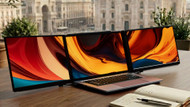
Unlike traditional, bulky desktop monitors, these displays are designed for mobility. They allow you to create a tri-screen setup instantly, eliminating the need to switch between tabs constantly and significantly boosting your efficiency.
Types of Portable Monitors
There are several types of portable monitors available in 2026, each designed for specific professional needs. Let's look at the most popular options:
USB-C Monitors
USB-C monitors are the gold standard due to their ease of connection and versatility. They plug directly into a laptop with a single cable for both power and display transmission. This is the ideal solution for those who prefer a clutter-free workspace and fast, reliable connectivity.
HDMI Monitors
HDMI monitors remain a great option, particularly for connecting to gaming consoles or older PCs. Using Mini HDMI to HDMI connections, these monitors provide high-quality video and audio signals, making them perfect for media consumption and gaming.
Touchscreen Monitors
For those who need more interactivity, touchscreen portable monitors allow users to navigate through touch gestures. This is often beneficial for creative professionals working on presentations or anyone who prefers a more hands-on digital experience.
Key Features to Look for When Choosing a Portable Monitor
Picking the right portable monitor depends on several factors that can make all the difference to your daily workflow. Here is what you should consider before buying:
1. Screen Size and Resolution
Most portable monitors range between 14 and 17 inches. While 1080p used to be the standard, 2026 professionals now look for 2K resolution (2560 x 1600) to match modern laptop displays. This higher resolution ensures text is crisp and images are sharp, reducing eye strain during long hours.
2. Connectivity and Power
Ensure your monitor has the right ports. USB-C with pass-through charging is essential; it allows you to charge your laptop through the monitor (up to 100W), simplifying your cable management.
3. Portability and Weight
Since you will likely be carrying your monitor in a bag, look for one that is lightweight. High-performance tri-screen setups like the Monduo Pro Duo weigh just 1.9 kg, making them easy for travellers and remote workers to carry alongside a 16-inch MacBook Pro or a similar PC laptop.
4. Gaming, Work, or Entertainment?
A gaming portable monitor requires a high refresh rate (144Hz) and low response times (3ms) for smooth gameplay. If you are using it for professional work, colour accuracy (100% DCI-P3) and brightness (500 nits) are far more important.
Portable Monitor vs Laptop Screen: Is It Worth It?
Investing in a portable monitor is one of the single best ways to improve your multitasking capabilities. Having three screens visible at once allows you to code on one, research on another, and manage communications on the third. Whether you are in a coffee shop or a hotel room, a portable tri-screen setup provides a comfortable, desktop-class experience anywhere in the world.
Best Portable Monitor of 2026: The Monduo Pro Duo
Based on real productivity needs and modern professional workflows, the Monduo Pro Duo stands out as the premier choice for 2026.
1. Best Overall for Productivity
The Monduo Pro Duo transforms your laptop into a complete tri-screen workstation. It does not just add a screen; it provides a unified, immersive environment that makes multitasking faster and more organised.
2. Exceptional Display Quality
With a stunning 2560 x 1600 resolution, 500 nits of brightness, and 100% DCI-P3 colour accuracy, it delivers professional-grade visuals. The 144Hz refresh rate also ensures every movement on screen is fluid and responsive.
3. Premium Build and Surface Options
- 14-Inch Model: Featuring an aluminium finish and a premium glass display surface.
- 16-Inch Model: Crafted from high-quality, durable plastic with a non-glare surface for maximum workspace and minimal weight.
4. Advanced Connectivity
The system supports USB-C and Mini HDMI, ensuring compatibility with everything from an M2 Max MacBook Pro to standard Windows laptops. It also features up to 100W pass-through charging, so your machine stays powered while you work.
Common Problems and Quick Fixes
- No Signal: Ensure your USB-C cable supports video output (DisplayPort Alt Mode). Check that all cables are seated firmly in the ports.
- Flickering Display: This is usually a power issue. Ensure your laptop is plugged into power, or use the monitor's power-only USB-C port to provide extra juice to the screens.
- Scaling Issues: Use the dedicated Monduo app for macOS or Windows to automatically match your native laptop resolution and scaling for a seamless visual experience.
Why Choose Us?
In a market filled with generic recommendations, our focus is clarity over confusion. We prioritise real productivity over specifications, helping you choose tools like the Monduo Pro Duo that genuinely improve how you work, manage tasks, and stay creative in a mobile-first world.
Frequently Asked Questions
How do I connect a portable monitor to my laptop?
Most modern monitors connect via a single USB-C cable. Plug it into a Thunderbolt or DisplayPort-enabled USB-C port, and it should detect automatically. For older devices, use the Mini HDMI to HDMI cable alongside a USB-C cable for power.
What is the best portable monitor for gaming in 2026?
For gaming, you need a high refresh rate. The Monduo Pro Duo is a top choice because it offers 144Hz at 2560 x 1600, providing an incredibly smooth and high-resolution experience for gamers on the move.
Can I use a portable monitor for professional work?
Absolutely. A tri-screen setup is the best way to boost productivity. Look for a model with 100% DCI-P3 colour accuracy and at least 500 nits of brightness to ensure your work looks professional in any environment.
Are portable monitors good for travelling?
Yes. They are specifically designed to be compact and lightweight (under 2 kg). USB-C compatibility means you only need one or two cables in your bag to have a full office setup in any hotel or cafe.
What is the difference between the 14-inch and 16-inch Monduo models?
The 14-inch model is aluminium with a glass screen, perfectly matching smaller laptops. The 16-inch model uses a durable plastic build with a non-glare surface to provide a massive workspace while remaining incredibly light and portable.