27th Apr 2026
Is A Triple Monitor Screen Setup Worth It in 2026?
Want to boost your productivity? A triple monitor setup might be the best solution. In 2026, professionals are increasingly using multiple screens to streamline workflows, enhance multitasking, and stay focused.
By optimizing your workspace with three monitors, you can reduce time spent switching between applications and fully utilize your screen real estate.
This setup isn’t just about adding more screens it’s about improving time management, task organization, and workflow efficiency. Whether you're a developer, designer, content creator, or office professional, a triple monitor setup can unlock your full potential.
What Is a Triple Monitor Setup and How Does It Work?
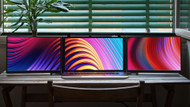
A triple monitor setup connects three displays to a single computer (laptop or desktop), allowing you to work across multiple screens simultaneously.
This setup can be achieved through:
- USB-C or HDMI connected monitors
- Laptop screen extenders
- Combination of built-in and external displays
The concept is simple: more screen space means less switching and better focus.
Types of Triple Monitor Setups
1. Traditional Desktop Setup
Three monitors connected to a desktop. Best for fixed workstations.
2. Portable Multi-Screen Setup
Lightweight portable monitors connected to a laptop ideal for remote work.
3. Laptop Screen Extenders
Compact solutions like the Monduo 16-inch Pro Duo or Monduo 14-inch Pro Duo turn your laptop into a triple-screen workstation instantly.
What to Look for in a Triple Monitor Setup
Display Quality
Choose Full HD or 2K resolution to reduce eye strain and improve clarity.
Connectivity Options
USB-C offers simplicity, while HDMI ensures broader compatibility.
For stable connections, use USB-C cable bundles or HDMI cables.
Brightness & Color Accuracy
Essential for designers, editors, and visual professionals.
Portability
Lightweight monitors are ideal for remote work and travel setups.
System Compatibility
Ensure your device supports multiple displays without performance issues.
Key Benefits of a Triple Monitor Setup
- Increased Screen Space: Work across multiple apps without switching tabs.
- Improved Multitasking: Keep tools, communication, and tasks visible.
- Enhanced Focus: Reduce distractions and interruptions.
- Better Organization: Assign each screen a specific role.
- Improved Ergonomics: Adjust monitors to reduce strain.
- Customization: Choose sizes and setups that fit your workflow.
Who Should Use a Triple Monitor Setup?
This setup is ideal for:
- Remote professionals managing multiple tools
- Freelancers handling multiple clients
- Developers working with code and documentation
- Editors and content creators
If your work involves multitasking, a multi-screen workflow can significantly improve efficiency.
How Triple Monitors Boost Productivity
Improved Workflow: Keep essential tools open simultaneously without switching tabs.
Better Task Management: Organize projects, communication, and work across screens.
Streamlined Communication: Use one screen for meetings and others for tasks.
Enhanced Focus: Reduce cognitive load and stay organized.
Common Problems & Fixes
- Monitor not detected: Check cables and update drivers.
- Performance issues: Close background apps or lower resolution.
- Power issues: Use pass-through charging solutions like USB-C adapters.
- Cluttered setup: Switch to a portable monitor solution.
Why Choose a Smart Portable Setup?
A triple monitor setup doesn’t have to be bulky. Portable solutions like Monduo portable monitor systems offer flexibility, performance, and clean workspace design.
It’s not about more screens it’s about smarter workflow and better productivity.
Frequently Asked Questions
1. How does a triple monitor setup improve productivity?
It allows multiple applications to stay open simultaneously, reducing the need to switch between windows.
2. Is it only for tech professionals?
No, it benefits anyone who multitasks, including remote workers and office professionals.
3. Is it difficult to set up?
No, simply connect monitors, adjust display settings, and optimize your workspace.
4. Is it bad for your eyes or neck?
Not if set up correctly. Proper positioning and monitor angles improve ergonomics.