16th Apr 2026
Best Portable Monitors for Remote Professionals in 2026
Optimising your workspace is key to staying focused and productive in 2026. The easiest way to improve your setup is to add a portable monitor. Whether you are working from home, a coffee shop, or on the go, a portable monitor gives you the extra screen space needed for multitasking and better workflow management.
A portable monitor is an external display that connects to your laptop or desktop via USB-C or HDMI. It allows you to manage emails, projects, and video calls more efficiently, ultimately boosting productivity.
In this guide, we’ll explore the best portable monitors for remote professionals in 2026, key features to consider, and how to choose the right setup for your needs.
What Is a Portable Monitor?
A portable monitor is a slim, lightweight external display designed to expand your screen space without the bulk of traditional monitors. These monitors are perfect for multitasking, project management, and video conferencing.
For remote professionals, portability is a major advantage. You can easily create a dual- or even triple-screen workspace wherever you go.
Key Features to Look For in a Portable Monitor
Screen Size & Resolution
Most users prefer a 15.6-inch display for the perfect balance between usability and portability. Full HD (1920×1080) works well for general tasks, while higher resolutions like 2K or 4K are ideal for design and video editing.
Weight & Portability
Choose a lightweight monitor (0.5–1 kg) with a slim design that fits easily into your bag. Foldable or compact models are ideal for professionals on the move.
Connectivity (USB-C & HDMI)
Modern portable monitors support USB-C for faster data transfer and power delivery. HDMI compatibility ensures broader device support.
For reliable connectivity, consider accessories like the USB-C pass-through adapter or USB-C cable bundle.
Brightness & Eye Care
Look for monitors with at least 250–300 nits of brightness. Features like blue light filters and flicker-free technology help reduce eye strain during long work sessions.
Battery vs Plug-in
Battery-powered monitors are ideal for travel, while plug-in models offer consistent performance for desk setups.
Best Portable Monitor for Remote Professionals in 2026
Instead of comparing endless options, it’s more effective to focus on a solution that truly enhances productivity. One standout choice is the Monduo 16-inch Pro Duo portable monitor, designed for modern remote workflows.
1. Best Overall for Productivity
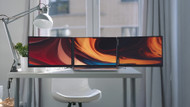
The Pro Duo transforms your laptop into a triple-screen setup, making multitasking faster and more organised.
2. Best for Advanced Workflows
Ideal for professionals managing research, communication, and execution simultaneously without constant tab switching.
3. Best Display Quality & Performance
With 2K resolution (2560×1600), ~500 nits of brightness, 100% DCI-P3 colour accuracy, and a 144Hz refresh rate, it delivers exceptional clarity and smooth performance.
4. Best for Flexible Connectivity
Supports USB-C and HDMI, ensuring compatibility with multiple devices. You can also use HDMI cables or USB-C cables for seamless connections.
5. Best for Portability & Setup Options
Available in both 14-inch and 16-inch Pro Duo models, making it adaptable for different laptop sizes and workflows.
How to Set Up a Portable Monitor
- Choose the right monitor: Select based on size, resolution, and portability.
- Connect your device: Use USB-C or HDMI cables.
- Adjust display settings: Extend your screen for multitasking.
- Position ergonomically: Maintain proper eye level for comfort.
- Organise your workspace: Use the extra space for tools and apps.
How Portable Monitors Boost Productivity
Multitasking: Work on documents while managing emails or video calls simultaneously.
Collaboration: Share screens easily during meetings or presentations.
Workflow Efficiency: Organise tasks better with expanded screen real estate.
Common Issues & Fixes
- If the screen flickers, adjust the refresh rate or switch ports.
- Ensure your device supports external displays.
- Check the power supply if using a battery-powered monitor.
Portable Monitor vs Tablet
While tablets offer flexibility, they lack the larger screen size and multitasking capabilities of portable monitors. Portable monitors provide better resolution, improved ergonomics, and a more efficient workflow setup.
Is a Portable Monitor Worth It?
A portable monitor is a must-have tool for remote professionals in 2026. It enhances productivity, improves organisation, and provides flexibility for working anywhere.
If you frequently multitask or work remotely, investing in a high-quality solution like the Monduo portable monitor lineup is a smart choice.
Frequently Asked Questions
How does a portable monitor improve productivity?
It increases screen space, allowing you to manage multiple tasks simultaneously without switching tabs.
Are portable monitors compatible with all laptops?
Most modern laptops support USB-C or HDMI connections, but you should always check compatibility.
Can I use a portable monitor for gaming or video editing?
Yes, especially models with a high resolution and refresh rate.
How do I set up a portable monitor?
Connect via USB-C or HDMI, extend your display, and position it comfortably.
Is it worth buying a portable monitor in 2026?
Absolutely. It improves productivity, flexibility, and workflow efficiency for remote professionals.