21st Apr 2026
Is a Screen Extender Worth It? Pros, Cons & Buying Guide (2026)
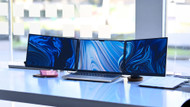
You can extend your display beyond your laptop or desktop monitor with a screen extender. By adding another display, you gain more screen real estate and improve multitasking efficiency.
If you're looking to boost productivity and organize your workspace in 2026, a screen extender can be a game-changer. But is it worth the investment? Let’s explore the pros, cons, and how it can optimize your setup.
What is a Screen Extender?
A screen extender is a device that allows you to add additional displays to your system without requiring multiple built-in ports. It typically connects via USB-C, HDMI, or USB.
Whether you're using a laptop or desktop, a screen extender helps you manage multiple apps, documents, and windows simultaneously making multitasking much easier.
Pros of Using a Screen Extender
- Increased Screen Space: Adds extra display space for multitasking.
- Improved Productivity: Organize work, emails, and tools across multiple screens.
- Enhanced Focus: Reduces tab switching and distractions.
- Portability: Ideal for remote workers and travelers.
- Better Ergonomics: Adjustable positioning reduces neck strain.
- Easy Setup: Plug-and-play installation for most devices.
Cons of Using a Screen Extender
- Requires Desk Space: Extra screens need more room.
- Compatibility Issues: Not all devices support extenders.
- Potential Distractions: Multiple screens can be overwhelming.
- Limited Resolution: Some budget options offer lower quality displays.
How to Set Up a Screen Extender
- Choose the Right Extender: Ensure compatibility with USB-C or HDMI.
- Connect Your Device: Plug into your laptop or desktop.
- Adjust Display Settings: Extend or mirror your screen.
- Ergonomic Placement: Position at eye level for comfort.
- Optimize Workflow: Use screen management tools.
Best Screen Extenders for 2026
- Monduo Pro Duo (14” & 16”): Triple-screen portable monitor with 2K resolution (2560×1600), 144Hz refresh rate, USB-C & HDMI connectivity, and pass-through charging.
Best for professionals and remote workers.
View 16-inch model | View 14-inch model - AOC I1659FWUX: Budget friendly USB-powered monitor.
- ViewSonic TD2230: Touchscreen monitor for interactive work.
- GeChic 1503H: Portable and travel friendly option.
- ASUS ZenScreen MB16AC: Compact USB-C monitor for daily use.
For a complete multi-screen setup, you can also explore Monduo portable monitor solutions and compatible accessories like USB-C cable bundles or HDMI cables.
Is a Screen Extender Worth It in 2026?
Yes, a screen extender is worth it if you want to improve productivity, multitasking, and workspace organization.
It’s especially useful for students, professionals, traders, and remote workers. While it may require extra desk space, the productivity gains often outweigh the downsides.
If you frequently work with multiple applications, a screen extender can significantly improve efficiency and workflow.
Frequently Asked Questions
1. What are the benefits of a screen extender?
It increases productivity by allowing multiple apps and documents to stay open simultaneously.
2. Can it improve remote work?
Yes, it creates a more organized workspace and reduces the need to switch between windows.
3. Are screen extenders compatible with all devices?
Most work with USB-C or HDMI, but always check compatibility before buying.
4. Are they good for gaming?
Yes, especially models with higher refresh rates for smoother gameplay.
5. Can a screen extender replace a second monitor?
It can for general use, but high performance tasks may still require a dedicated monitor.