13th Oct 2025
Elevate Your Work From Home Experience with Monduo
In the era of remote work, crafting the ideal home office setup has become essential for productivity, comfort, and efficiency. Gone are the days of cubicles and water cooler chats; now, the world is your workspace, and how you design it can significantly impact your work-life balance.
From ergonomic chairs to noise-cancelling headphones, every detail matters. However, one often overlooked aspect is screen real estate.
The revolutionary solution for portable tri-screen setups is here, and it is better than you would expect.
Challenges of Remote Work
Millions of people throughout the world have embraced the freedom and convenience that remote work offers, and the shift to it has been quick and revolutionary. But despite the increased independence, problems still exist:
- Boundaries become hazy
- Distractions are everywhere
- Staying productive is a daily challenge
Having the ideal home office setting creates a specialised area that encourages concentration and creativity.
Setting Up the Ideal Home Office
The ideal setting is the first step towards a productive workspace:
- Choose a calm, well-lit space free from distractions
- Invest in ergonomic furniture to improve posture and general health
- Ensure proper desk and chair height for comfort
Why Screens Matter
Your digital toolkit, and more specifically your screens, can be the most important component. Multiple monitors:
- Increase productivity
- Improve multitasking
- Reduce the need to constantly switch between windows and tabs
Introducing Monduo: The Portable Tri-Screen Solution
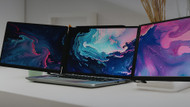
Monduo revolutionises remote work by offering a portable dual-screen setup that seamlessly integrates with your laptop, effectively creating a tri-screen workspace.
- Lightweight and compact: Easy to carry in a laptop bag
- Simple setup: Connect via USB-C or Mini HDMI
- Flexible workspace: Use at home, coffee shops, or co-working spaces
Monduo Features and Specs
- 144Hz refresh rate for incredibly smooth visuals and up to 3ms response time
- 2560 x 1600 resolution with a 100% DCI-P3 colour gamut
- 500 nits brightness to minimise glare and reflections
These features ensure crisp, vibrant visuals for immersive work experiences, whether you are editing graphics, analysing data, or attending virtual meetings.
Practical Workflow Use Cases
- Designers and Creatives: Keep reference images, editing panels, and previews open simultaneously
- Coders and Developers: Keep code, documentation, and testing environments visible at once
- Remote Professionals: Keep video calls, CRMs, and emails accessible without toggling
- Students: Keep notes, research, and assignments displayed together
Using the Monduo reduces cognitive switching and helps maintain focus throughout long work sessions.
Ergonomics and Productivity Tips
- Position the centre screen at eye level
- Maintain a proper viewing distance to reduce eye strain
- Adjust screen angles for a natural posture
- Keep the workspace organised to reduce distractions
- Use a wireless keyboard and mouse to maintain a clutter-free setup
Common Setup Mistakes to Avoid
- Placing screens too close together
- Poor lighting causing glare or eye fatigue
- Ignoring cable management
- Misaligned or uneven monitor angles
- Using uncomfortable chairs or desks
Portability Benefits
- Perfect for digital nomads and frequent travellers
- Transforms any space into a productive oasis
- Carry your office wherever you go without compromising your workflow
Conclusion
In the era of remote work, Monduo transforms the way you interact with your workspace. Combining portability, high-quality displays, and an ergonomic setup, it enhances productivity, creativity, and multitasking capabilities. By integrating Monduo into your home office, any space can become an organised, efficient, and future-ready workstation.
Frequently Asked Questions
How does Monduo improve remote work productivity?
By providing multiple screens, Monduo reduces constant window switching, allows simultaneous work on different tasks, and helps maintain focus.
Who can benefit from Monduo?
Designers, developers, remote professionals, students, and creatives who require multitasking and extended screen space.
Is Monduo ergonomic for long hours?
Yes. Properly positioning the screens and maintaining good posture ensures comfort and reduces neck or eye strain.
How portable is Monduo?
Its lightweight and foldable design fits easily into your laptop bag, making it simple to carry and set up anywhere.
What connection options are available?
Monduo supports USB-C and Mini HDMI to HDMI for seamless connectivity with laptops.
Any tips for optimising the Monduo setup?
Align the centre screen with eye level, declutter your desk, use proper lighting, and save screen layout presets for frequently used tasks.