12th Jan 2026
Best Portable Monitors for MacBook Users
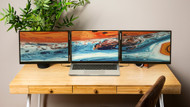
Working on a single MacBook screen can slow down productivity, especially when you constantly switch between tabs, documents, or creative tools. A portable monitor system can create essential extra workspace, helping you multitask efficiently. Monduo Pro Duo portable monitors are designed for seamless integration with MacBooks, offering a professional tri-screen setup that is lightweight, highly colour-accurate, and plug-and-play.
In this article, we will explore key features for MacBook users, compatibility considerations, and compare the 14-Inch and 16-Inch Pro Duo models.
Best Portable Monitor for MacBook
MacBook users need portable monitors that are easy to connect, lightweight, and fully compatible with macOS. Focus on:
- USB-C/Thunderbolt support for both power and display (pass-through charging)
- Plug-and-play setup without the need for clunky adapters
- A stable, ergonomic design that matches Apple's aesthetic
- Lightweight and travel-friendly builds
- Extended display support natively within macOS
Monduo Pro Duo monitors meet all these requirements, delivering a reliable, high-resolution tri-screen experience.
USB-C Portable Monitor for Mac
USB-C connectivity is crucial for modern MacBooks. It enables:
- Power and high-fidelity video through a single cable
- Up to 100W pass-through charging to keep your MacBook powered
- A cleaner workspace with fewer adapters and cables
- A rapid plug-and-play setup
Monduo Pro Duo monitors use USB-C to ensure smooth integration with all supported MacBooks, from the M1 generation through to the latest Apple Silicon chips.
Lightweight & Plug-and-Play Experience
A lightweight, foldable monitor makes portability easy. The Monduo 14-Inch Pro Duo is perfect for users who travel frequently, while the 16-Inch Pro Duo balances portability with an expansive display for heavy multitasking.
Both models are plug-and-play, meaning you can start working immediately after connecting your MacBook. Additionally, Monduo offers a dedicated macOS application to seamlessly synchronise brightness, refresh rates, and display layouts directly with your MacBook.
What Size Portable Monitor Is Best?
- 14-Inch Pro Duo: Best for portability and travel-friendly use. It perfectly matches 14-inch MacBooks and is ideal for multitasking and daily office work.
- 16-Inch Pro Duo: Best for intensive multitasking, creative work, and matching the dimensions of larger laptops. For example, if you are editing 4K video or running complex code on a 2023 MacBook Pro 16-inch with an Apple M2 Max chip and 32 GB of RAM, the Monduo flawlessly extends that immense processing power across two additional 2560 x 1600 displays.
Both sizes drastically enhance productivity without overwhelming the MacBook’s sleek form factor.
Monduo Pro Duo for MacBook Users
14-Inch Pro Duo
The 14-Inch Pro Duo is compact yet incredibly powerful. It provides two additional 2560 x 1600 screens in a foldable design, perfect for on-the-go productivity.
Best for:
- Remote workers and digital nomads
- Business travellers
- Students and consultants
New Year Deal: Use the code NY14 to get $150 OFF the Monduo 14-Inch Pro Duo.
16-Inch Pro Duo
The 16-Inch Pro Duo offers a massive workspace, ideal for users who need multiple resource-heavy apps open simultaneously or who work with highly detailed visual content.
Best for:
- Graphic designers and video editors (100% DCI-P3 colour accuracy)
- Data analysts and financial traders
- Professionals handling multiple demanding applications
New Year Deal: Use the code NY16 to get $100 OFF the Monduo 16-Inch Pro Duo.
Comparison Table – 14-Inch vs 16-Inch for MacBook
| Feature | Monduo 14-Inch Pro Duo | Monduo 16-Inch Pro Duo |
|---|---|---|
| Compatibility | M1, M2, M3 Pro/Max, M4 MacBook Pro 14", M4 Air 15" | Intel 2019+ and all Apple Silicon (M1 to M5 Pro/Max) |
| Screen Setup | Dual 14-inch displays (Tri-screen total) | Dual 16-inch displays (Tri-screen total) |
| Resolution | 2560 x 1600 @ 144Hz | 2560 x 1600 @ 144Hz |
| Portability | Very lightweight & compact (1.9 kg) | Expansive but still portable (1.9 kg) |
| Best Use Case | Travel & everyday workflow efficiency | Heavy multitasking & intensive creative work |
| USB-C Support | Yes (with up to 100W pass-through charging) | Yes (with up to 100W pass-through charging) |
| Setup Type | Plug-and-play with macOS app support | Plug-and-play with macOS app support |
| Ideal MacBook Users | Students, consultants, travellers | Professionals, creators, power users |
| New Year Deal | $150 OFF (Code: NY14) | $100 OFF (Code: NY16) |
Final Thoughts
Monduo Pro Duo portable monitors are the ultimate solution for MacBook users seeking flexibility, productivity, and convenience. Whether you choose the 14-Inch Pro Duo for ultimate portability or the 16-Inch Pro Duo for a massive, colour-accurate workspace, both models seamlessly enhance your macOS experience.
With the New Year deals available, now is the perfect time to upgrade your MacBook setup and start 2026 with a highly efficient tri-screen workstation.
Frequently Asked Questions
Which portable monitor features matter most for a MacBook?
USB-C/Thunderbolt connectivity, a lightweight design, plug-and-play setup, high-resolution screen quality (matching Apple's Retina displays), and multi-screen functionality are the most important. Monduo Pro Duo monitors provide all of these in a premium, travel-friendly design.
Do portable monitors work with MacBooks?
Yes. Portable monitors like the Monduo Pro Duo are fully compatible with supported macOS devices and work seamlessly as extended displays for multitasking.
Is USB-C required for a portable monitor on a Mac?
Yes. USB-C drastically simplifies the setup, reduces cable clutter, provides pass-through power, and ensures high-bandwidth display output on modern MacBooks.
What size portable monitor is best?
- 14-inch: Highly portable, travel-friendly, and aligns perfectly with 14-inch MacBooks.
- 16-inch: Provides a massive workspace for multitasking and creative work, aligning perfectly with 16-inch MacBooks.
Can a tri-screen portable monitor improve productivity?
Absolutely. A tri-screen setup allows multiple applications to be fully visible simultaneously, drastically reducing cognitive interruptions and speeding up your workflow.
Can I use the Monduo Pro Duo for graphic design on a MacBook?
Yes. The 2560 x 1600 resolution and 100% DCI-P3 colour gamut make both models especially suitable for designers, developers, and content creators who require professional-grade colour accuracy.
Are Monduo Pro Duo monitors plug-and-play?
Yes. Both the 14-inch and 16-inch models offer plug-and-play functionality, meaning you can start using them immediately after connecting them to your MacBook. The optional Monduo macOS app adds extra quality-of-life features like brightness syncing.
Is the 14-Inch Pro Duo good for travel?
Yes. Its lightweight and compact design makes it perfect for MacBook users who travel frequently and require a portable multi-screen solution.
Can I use a Monduo Pro Duo monitor for work presentations?
Yes. Both models can be used for on-the-go presentations, allowing you to mirror or extend your MacBook screen efficiently to clients across a table.
How do I set up a Monduo Pro Duo with my MacBook?
Connect the monitor using the included USB-C cables. Both power and display data run through a single connection per screen. The monitors are automatically detected by macOS as extended displays.
Do Monduo Pro Duo monitors support macOS screen scaling?
Yes. Monduo Pro Duo monitors fully support native macOS HiDPI display settings, allowing you to adjust the resolution and scaling to perfectly fit your workflow.