6th Jan 2026
Best Portable Dual Screen Monitors
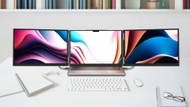
Working on a single laptop screen can slow down productivity, especially when you constantly switch between tabs, documents, and applications. This is where a portable tri-screen monitor system becomes a practical solution. Monduo Pro Duo portable monitors are designed to extend your workspace anywhere, offering a professional multi-screen setup without the need for a fixed desk environment.
In this article, we will cover the key features of portable monitors, explain what really matters when buying one, and break down the differences between the Monduo 14-Inch Pro Duo and the Monduo 16-Inch Pro Duo.
Features of a Premium Portable Monitor
A portable monitor should feel like a natural extension of your laptop. The most important features include a clear display, stable mounting, easy connectivity, and a design that supports long working hours. Tri-screen portable monitors take this further by allowing true multitasking without external stands or extra accessories.
Monduo Pro Duo monitors focus on productivity by combining two extended high-resolution displays into one foldable, easy-to-mount unit.
Key Features to Look For
When choosing a portable monitor, these features matter the most:
- A tri-screen setup for seamless multitasking
- A lightweight and foldable design
- USB-C connectivity for a quick, single-cable setup
- A stable hinge for ergonomic viewing angles
- Wide compatibility with modern Mac and Windows laptops
These features ensure the monitor can be used comfortably at home, in the office, or while travelling.
Why Build Quality Matters
Not all portable monitors deliver the same experience. Stability, screen clarity, and ease of use are essential for daily productivity. A good portable monitor should reduce distractions, improve your workflow, and integrate smoothly with your existing setup.
Monduo Pro Duo monitors are built with premium materials for users who need reliability and consistent performance throughout the workday.
Choosing the Right Screen Size
Screen size plays a major role in usability. Smaller screens offer better compact portability, while larger screens provide an expansive workspace. Choosing the right size depends on the size of your laptop and how you plan to work.
The Monduo Pro Duo series offers flexibility with two optimised size options.
Monduo 14-Inch Pro Duo Portable Monitor
Overview
The Monduo 14-Inch Pro Duo is designed for users who need a compact yet powerful tri-screen solution. It delivers extended screen space while remaining lightweight and easy to carry.
Performance & Productivity
With two additional 14-inch screens, users can keep essential applications open side-by-side. Emails, documents, and dashboards can run simultaneously, reducing the need to switch between tabs and drastically improving focus.
Portability & Use Case
The 14-Inch Pro Duo is ideal for:
- Remote workers
- Business travellers
- Consultants and students
Its compact design makes it easy to carry in a standard laptop bag while still providing a professional multi-screen experience.
Connectivity
USB-C connectivity allows for both power and display pass-through via a single cable, making the setup fast and clutter-free with supported laptops.
New Year Deal – 14-Inch Pro Duo
Use the code NY14 to get $150 OFF on the Monduo 14-Inch Pro Duo. This limited-time New Year deal is perfect for users looking for a portable productivity upgrade.
Monduo 16-Inch Pro Duo Portable Monitor
Overview
The Monduo 16-Inch Pro Duo is built for professionals who want a larger workspace and a more immersive tri-screen setup. It perfectly complements larger laptops, offering expansive viewing space for demanding tasks.
Performance & Productivity
The larger 16-inch screens make multitasking more comfortable, especially for users working with large spreadsheets, multiple browser windows, or detailed video editing timelines. The expanded display area improves workflow efficiency during long work sessions.
Screen Size & Work Comfort
The 16-Inch Pro Duo is well-suited for:
- Traders and data analysts
- Designers, developers, and creators
- Office professionals handling complex tasks
It delivers a true desktop-like experience while remaining highly portable.
Connectivity
Like the 14-inch model, the 16-Inch Pro Duo utilises USB-C and Mini HDMI for a quick plug-and-play setup with supported devices.
Monduo Pro Duo Comparison Table
| Feature | Monduo 14-Inch Pro Duo | Monduo 16-Inch Pro Duo |
|---|---|---|
| Screen Setup | Dual 14-inch displays (Tri-screen total) | Dual 16-inch displays (Tri-screen total) |
| Resolution & Speed | 2560 x 1600 @ 144Hz | 2560 x 1600 @ 144Hz |
| Best For | Travel & remote work | Heavy multitasking & creative work |
| Portability | Highly portable (1.9 kg) | Larger but highly portable (1.9 kg) |
| Workspace Size | Compact & efficient | Expansive & immersive |
| Productivity Use | Emails, documents, coding | Spreadsheets, design tools, timelines |
| Connectivity | USB-C / Mini HDMI | USB-C / Mini HDMI |
| Setup | Plug-and-play | Plug-and-play |
| Ideal Users | Students, consultants, travellers | Traders, professionals, creators |
| New Year Offer | $150 OFF (Code: NY14) | $100 OFF (Code: NY16) |
Final Thoughts
Monduo Pro Duo portable monitors are built for professionals who want flexibility, efficiency, and a true multi-screen experience. Whether you choose the 14-Inch Pro Duo for compact portability or the 16-Inch Pro Duo for maximum workspace, both models offer a practical, high-performance solution for modern work setups.
With the New Year deals currently available, this is the perfect time to upgrade your workspace and start the year more productively.
Frequently Asked Questions
Tri-Screen Setup Portable Monitor – Why It Matters
A tri-screen portable monitor system allows users to work much more efficiently by keeping multiple applications fully visible at the same time. This setup improves task management, reduces cognitive interruptions, and helps you complete work faster compared to a single-screen workflow.
Is USB-C Important in a Portable Monitor?
Yes. USB-C simplifies the setup by reducing cable clutter and enabling simultaneous power and display connectivity. A portable monitor with USB-C is far easier to use across different environments, making it a key feature for modern professionals.
What Is the Best Screen Size for a Portable Monitor?
There is no one-size-fits-all answer. It is best to match the monitor to your laptop's native size:
- Choose the 14-inch model if you use a 14" to 15.6" laptop and portability is your top priority.
- Choose the 16-inch model if you use a 15.6" to 17.3" laptop and need maximum screen space and comfort.
Both options are expertly designed to drastically enhance your daily productivity.